LinkedIn’s Strategy for Starting from Scratch in Foreign Trade: How to Use LinkedIn to Develop Overseas Customers?
As foreign traders know, LinkedIn’s overseas market has enormous potential. Similar to Facebook, Twitter, or Instagram, LinkedIn is also a social media platform and an important channel for developing overseas customers. More and more people are using this platform to explore overseas markets. For practitioners in the foreign trade industry, mastering how to use LinkedIn to develop customers is crucial. This article will share some practical LinkedIn customer development strategies and techniques to help you efficiently utilize LinkedIn to expand your business landscape.

Preliminary Preparation Work
LinkedIn Account Registration
1. Registration information
To ensure the authenticity of information, it is recommended to use the LinkedIn web version for registration. The app does not have as many features as the web version, and the English page has more features than the Chinese page. In addition, when registering, fill in your real Chinese name. After successfully registering, log in and complete your LinkedIn personal information before filling in your English name.
2. Profile picture
LinkedIn is a workplace platform, and it is recommended to use a clear and formal personal photo when registering for a profile picture. It is best to choose a frontal business photo, with a clean and not cluttered background. It is recommended to use a solid color background, such as white or blue. At the same time, ensure that your expression is friendly and meets the basic requirements of business occasions.
3. Information filling
When filling out personal information such as position information, it is important to provide a clear and professional overview of your position and job responsibilities. Even if you are a salesperson or salesperson, you can choose a more precise job title description, such as “Product Manager”, which helps to demonstrate your ability to develop products for potential overseas customers. Remember to fill in personal information in English for better understanding by overseas customers.
Improve Personal Profile
The completeness of your personal profile directly affects your image on LinkedIn, which in turn affects potential customers’ judgment of whether you are trustworthy. Moreover, a well-organized and informative personal profile can also increase the pass rate of friend applications.
1. Professional title
This is not just your job title, it is the core of your professional image. Professional titles should be concise and attractive, not limited to formal job titles. You can choose a title that highlights your professional strengths, such as “Digital Marketing Expert | Growth Hacker” or “Supply Chain Manager | International Logistics and Trade Expert”. This title can quickly convey your professional skills and industry experience.
2. Background image
The background image is the visual focus of your personal profile. Choose an image that represents your professional image or industry characteristics. For example, if you work in the creative industry, you can choose a picture that displays creative works; If you are in the financial industry, you can choose a background that displays an economic chart or business style.
3. Work experience
Ensure that your work experience is clear and detailed, especially the most recent and relevant ones. For each work experience, in addition to listing the company name, position, and tenure, you should also explain your job responsibilities and achievements in sections, and incorporate quantitative results as much as possible, such as increasing sales by 20%, reducing costs by 15%, etc., to demonstrate your contribution and professionalism.
4. Skill recognition
Add your professional skills to your profile, and then invite your LinkedIn friends to like your skills. The more recognition a skill receives, the higher the credibility of your profession. This not only increases your visibility on LinkedIn, but also helps establish your expert position in specific fields.
5. Recommendation letter
The recommendation letter received is an important evidence of your professional ability and interpersonal relationships. You can ask your colleagues or clients to write a recommendation letter for you, which will greatly enhance your personal reputation. A good recommendation letter should specifically mention your contribution to a project, or your work attitude and team spirit.
LinkedIn Customer Development Methods
On LinkedIn, friends are called connections; Adding friends is called Connect. It is crucial to increase the number of connections when developing clients at LinkedIn. This not only expands your professional network, but also increases your visibility on the platform, thereby attracting more potential customers. Using product industry keywords to search for potential customers and other methods are effective ways to increase the number of connections. However, be careful not to add contacts too frequently, and it is recommended to limit the number of additions to around 100 per day. Here are some specific methods to help you successfully develop customers on LinkedIn:
1. Developing customers through synchronized email
LinkedIn will automatically check if the contacts in your email correspondence have already registered with LinkedIn. If you have an email account that is frequently used to communicate with international clients, you can synchronize it to LinkedIn. This can quickly find people you have already contacted and add them as friends. For example, you may have attended industry conferences and established contact with people by exchanging business cards. After synchronizing your email, LinkedIn will automatically recommend these people to you, allowing you to quickly establish online contact with them.
2. Cleverly using “People you may know”
LinkedIn has a friend recommendation function, click on “My Network” – “People you may know”, which will recommend people you may know based on your work experience, educational background, and existing network. You can filter appropriately from these recommendations and add those who share common ground or potential business interests with you.
3. Cleverly using “Who viewed your profile”
This feature allows you to see who has accessed your profile. If you find that industry insiders have viewed your profile, you can initiate contact and mention that they have visited your LinkedIn account, which can be a very natural opening statement.
4. Cleverly using “People also viewed”
Generally, on the right side of the personal profile interface, there will be “People also visited”, and LinkedIn will display people who have also been browsed by other users. These contacts may have similar backgrounds or interests to your target customers and can serve as a direction for potential customer development.
5. Cleverly using search boxes and keywords
Use LinkedIn’s search function to enter keywords related to your product or service. In this way, you can find people working in this field or potential customers with a demand for such products.
6. Cleverly using search box+Companies
If you want to interact with decision-makers or employees of a specific company, you can use the “Companies” filtering option. This can directly find the list of employees of the target company, and then accurately develop business opportunities.
7. Cleverly using search box+Groups
Joining relevant industry groups on LinkedIn can help you connect with professionals in the industry. Note that this function can only be used in the English interface. Being active in groups, participating in discussions, and showcasing your professional knowledge are all good ways to develop new customers.
8. Share updates and post articles
Regularly sharing industry trends, insights, or original articles on LinkedIn can enhance your professional image and attract the attention of potential customers. For example, if you are an expert in the supply chain field, sharing the latest trends and personal perspectives on supply chain management will attract professionals and potential customers in the same industry.
9、Create your own company homepage and Group
The company homepage is a platform for showcasing a company’s brand and culture. Through the homepage, potential customers can intuitively understand your business and services. At the same time, creating professional groups can gather individuals with specific interests or industries, which not only enhances your authority in the field but also helps establish closer professional connections.
Notes When Developing Customers
Control the Number of Times You Add Friends
LinkedIn has a monitoring mechanism for abnormal online activities such as frequently adding friends. If you send a large number of connection requests in a short period of time, it may be marked as spam by the system, leading to account restrictions or bans. Therefore, do not add friends recklessly from the beginning. It is recommended to gradually and selectively add contacts to maintain the health of your account.
Identify Target Customers
Not all LinkedIn users are your potential customers, so thorough research should be conducted before adding contacts. Understand your target market, identify the characteristics of ideal customers, including their industry, position, company size, etc., and filter out truly valuable connections based on this.。
Personalized Friend Application
Avoid using LinkedIn’s default friend invitation information as it may not appear professional enough. Take time to write a personalized invitation that explains why you want to establish a connection with the other person, your professional background or commonalities, and the potential benefits of establishing a connection. For example, “Hello [Name], I noticed that we are all passionate about [Industry], and I am impressed by your work at [Company]. I believe we can share many valuable industry insights and look forward to building a connection with you.”
Adhere to LinkedIn Etiquette
Maintaining professionalism and respect is crucial when sending connection requests. Do not directly promote your product or service in the first communication, but rather establish relationships and trust, and showcase your professional knowledge and passion for the industry by sharing valuable content and participating in discussions.
Advanced Tips for LinkedIn Developing Customers
More Accounts, More Opportunities
To further develop customers, you can try having multiple accounts, which can help you expand your network coverage and reach out to more industry professionals from different fields. Each account can be targeted specifically for a specific region or market, allowing you to better shape your personal brand and influence in various segmented fields. Although an account can add up to 30000 friends, LinkedIn has strict management over sending friend invitations, limiting the number of invitations per day. If you have multiple LinkedIn accounts, you can add more friends and build a richer network.
Batch 0peration Account
If you have multiple LinkedIn accounts, you can significantly increase your online visibility and interaction frequency through bulk operations. For example, by releasing industry related content or news in bulk, you can simultaneously enhance your brand awareness within different circles.
However, it should be noted that batch operation of accounts also carries its risks. The LinkedIn platform may detect abnormal login behavior, such as operating multiple accounts on the same device at the same time. The platform may suspect that these accounts are operated by the same person, which may lead to account association, making it easy to be restricted or continuously banned.
Using AdsPower Fingerprint Browser
In order to avoid account association bans caused by batch operations, AdsPower is committed to providing a clean and independent environment for account batch marketing in cross-border e-commerce, overseas social media, and other scenarios. It allows each LinkedIn account to run in a separate browser environment, each with a unique browser fingerprint, ensuring that each account’s login behavior appears to be sent from different devices, thereby reducing the correlation between accounts. This means you can safely manage multiple accounts, whether it’s LinkedIn, Facebook, or Instagram, without alerting the platform.
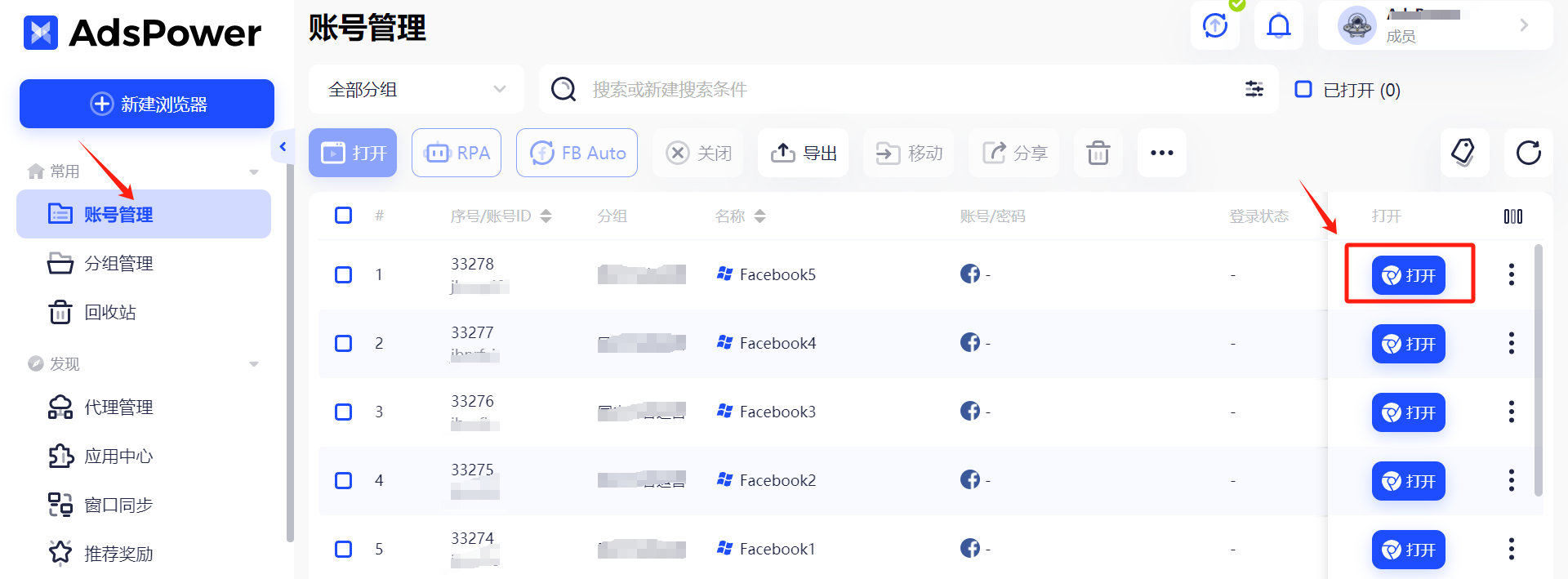
In addition, AdsPower can effectively reduce the labor cost of daily traffic matrix layout and achieve more efficient account management through its mobile device simulation function. AdsPower’s automation features provide tools such as codeless RPA robots, Local API automation interfaces, Facebook automation, etc. Users can flexibly configure according to their needs to meet different usage scenarios and achieve browser automation operations. Whether it’s posting regularly, automatically replying to messages, or managing multiple LinkedIn groups, AdsPower can help users save repetitive work and improve efficiency.
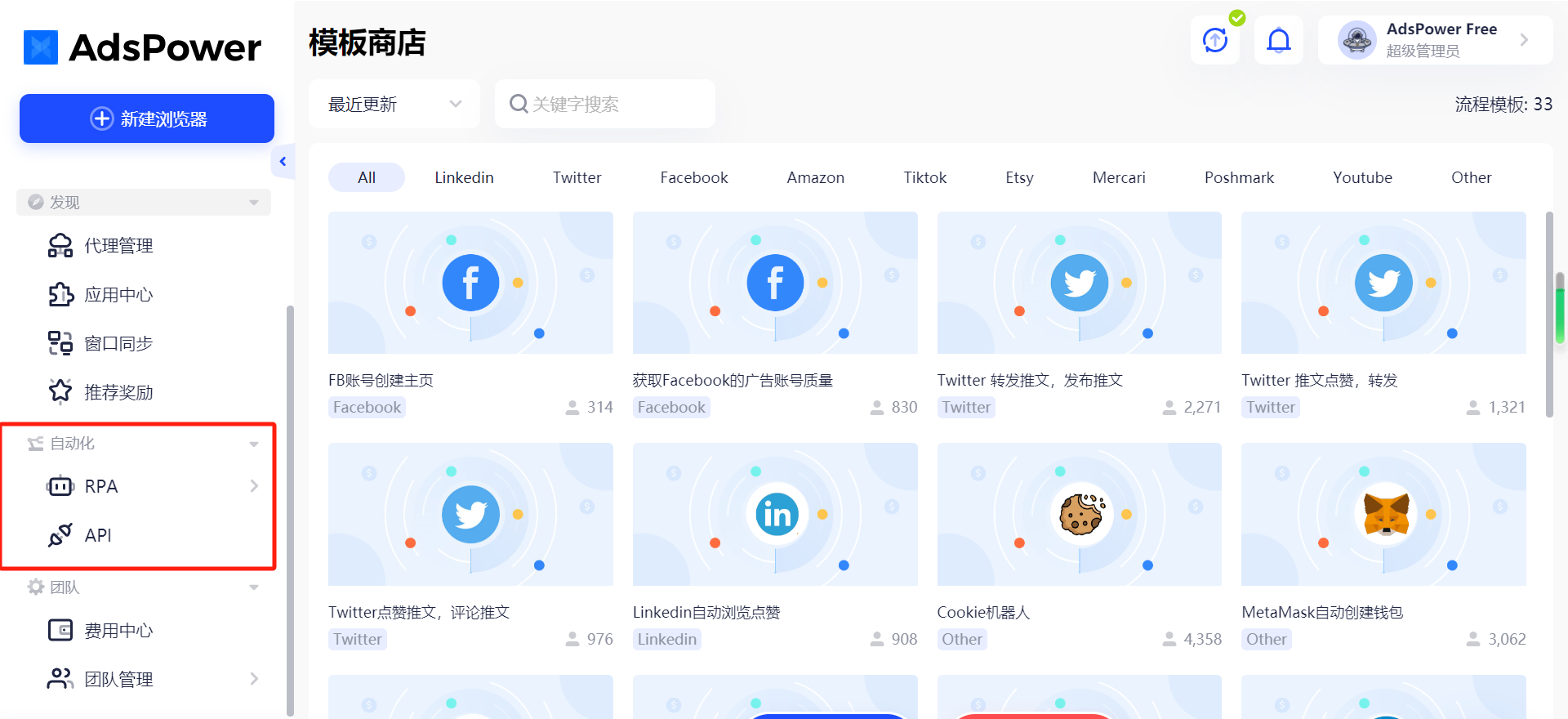
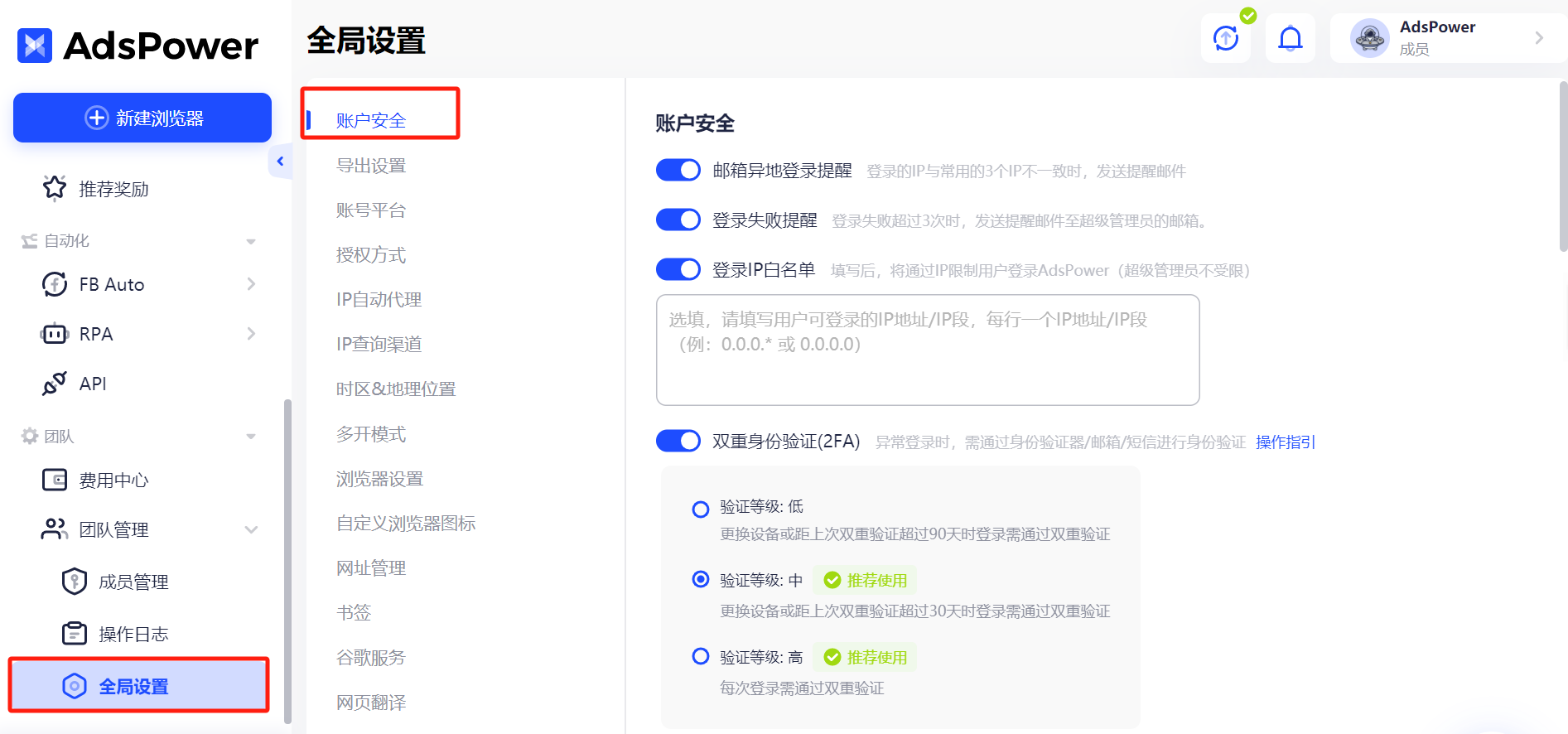
In terms of data security, AdsPower adopts multiple protection measures such as data encryption, SSL transmission encryption, and storage encryption to ensure the security of user data. Only users themselves can access and manage their data, ensuring the privacy of information. At the same time, AdsPower has also deployed multiple security measures, including dual authentication, whitelist settings, and remote login reminders, to further enhance the security level of the account.
Click to register for AdsPower( https://share.adspower.net/souhu11 )
Summary
In summary, LinkedIn will be an important tool for foreign trade enterprises to explore overseas customers. From the establishment and optimization of your initial account to finding and maintaining customers in the later stage, I hope these methods and techniques can help you effectively build a strong business network and seize more international business opportunities on LinkedIn. I hope this article can truly help everyone better develop overseas markets.